Welcome to the Schuldi Lab SOP Wiki
This wiki is a living document created to make our lab work easier, safer, and more productive. It is hosted on GitHub and built with Docusaurus, meaning anyone in the lab can (and should!) edit it.
Part 1: How to Contribute
1. Create a GitHub Account
To comment or edit, you need a free GitHub account.
- Sign up: github.com/join
- Join the Lab: Send your username to Benjamin (@benjamin-elusers) to be added to the lab github organization:
mschuldi-lab
2. How to Edit a Page
Found a typo? Wrong buffer concentration? Want to add a new trick?
-
Scroll to the bottom of any page and click "Edit this page".
-
This opens the file in GitHub. Click the Pencil Icon (✏️) to start writing.
-
Make your changes using the Markdown guide below.
-
Scroll down to "Commit changes", write a short description (e.g., "Updated lysis buffer pH"), and click the green button.
-
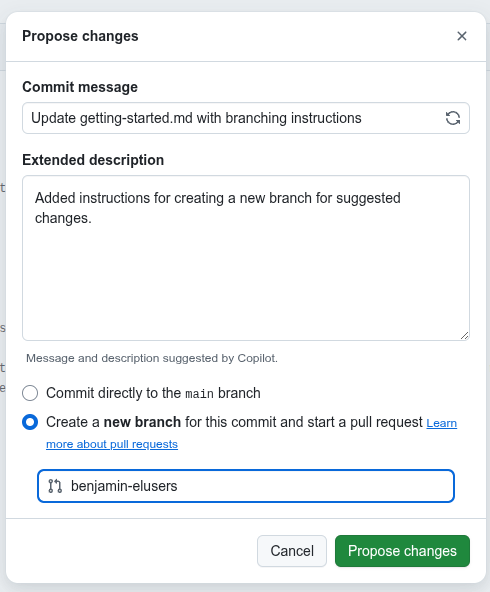
If you want to make a suggested change (like in "Track changes" from Word) look for the option to "Create a new branch for this commit and start a pull request." after clicking on the green buttong "Commit changes...". This will store your edit on a separate branch and it will request approval before being merged in the document.
3. How to Add a New Page
- Click "Edit" on any existing page to enter the folder view on GitHub.
- Navigate to the
docs/folder. - Click Add file > Create new file.
- Name your file ending in
.md(e.g.,new-protocol.md). - Add the Front Matter at the very top (see below) and start writing!
4. Curating SOP's imported content
We automatically converted our old 2025 Word Document into this website. While the robot did a good job, it wasn't perfect! Some paragraphs might be missing, or tables might look weird. We need your help to verify the content.
Here is the workflow for curation:
- Find a target: Look for a page that does not have a "Curated by..." line at the top.
- Open the Source: Download the original 2025 SOP Word Document.
- Compare: Read the website version side-by-side with the Word doc. Look for missing text, broken lists, or weird formatting (focus mostly on what should have been present on the online version)
- Fix it: Click Edit this page (✏️) and make corrections.
- Mark as Done: Once the page is perfect, add this line to the very top of the file so we know it's safe:
Curated by [Your Name] on [Date]
- Save safely: Select "Create a new branch for this commit and start a pull request" (as shown below) so we can review your fixes.
Part 2: Writing Content and Styling
No design or coding skills required.
The content is written as simple text using "Markdown"
What is Markdown?
It is a lightweight markup language that lets you format text using simple symbols. The goal is to be readable as-is with light formatting instructions.
Where to find help?
There is a built-in guide available directly in the editor, but it is small and easy to miss.
Look for the tiny M icon (see below) at the bottom right corner of the comment box or the GitHub text editor:
Click on it to open the full GitHub Markdown Guide
You can also bookmark the link above if you are interested to learn advanced formatting.
Part 3: Docusaurus Special Features
These features make our wiki look more organized. Use them at your will!
Admonitions (i.e. Callout Boxes)
Use these to highlight critical info.
:::note[**_Info_**]
General information or context about a protocol.
:::

:::tip[**Pro Tip:** ]
Use this for lab hacks or recommendations.
:::

:::warning[**Watch out!**]
Procedures that require extra attention.
:::

:::danger[**SAFETY HAZARD:** ]
Use this for toxic chemicals, radiation, or biohazards.
:::
Preview:
General information or context about a protocol.
Use this for lab hacks or recommendations.
Procedures that require extra attention.
Use this for toxic chemicals, radiation, or biohazards.
Collapsible Details
Great for hiding long lists or deep technical details.
<details>
  <summary>Click to see the full recipe</summary>

  1. Mix A and B
  2. Shake well
  3. Enjoy
</details>
Preview:
Click to see the full recipe
- Mix A and B
- Shake well
- Enjoy
Tabs
Useful for showing alternatives (e.g., Mac vs PC, or 50mL vs 500mL prep).
import Tabs from '@theme/Tabs';
import TabItem from '@theme/TabItem';

<Tabs>
  <TabItem value="small" label="50mL Prep" default>
    Use 5g of Agar.
  </TabItem>
  <TabItem value="large" label="500mL Prep">
    Use 50g of Agar.
  </TabItem>
</Tabs>
Preview:
- 50mL Prep
- 500mL Prep
Use 5g of Agar.
Use 50g of Agar.
Advanced customization (HTML tags)
Since Docusaurus uses MDX (Markdown + JSX), you can technically render almost any standard HTML tag.
But there are specific rules because it is processed as React, not raw HTML.
The Golden Rules:
-
Self-Closing Tags: All tags must be closed.
- ❌
<br>,<img>,<hr> - ✅
<br />,<img />,<hr />
- ❌
-
Attributes: Use camelCase for attributes.
- ❌
class="my-class" - ✅
className="my-class"
- ❌
-
Inline Styles: Styles must be objects, not strings.
- ❌
style="color: red;" - ✅
style={{ color: 'red', marginTop: '10px' }}
- ❌
-
Don't nest block elements inside inline elements (like
<div>or<h3>within<p>). This will crash the build (Hydration Error). -
Example of common tags:
- Layout:
<div>,<span>,<section>,<article> - Media:
<img />,<iframe />(great for embedding PDFs or Google Docs)
- Layout:
YouTube Videos
Standard Markdown doesn't support video embeds, but Docusaurus does via basic HTML or Plugins.
The simplest way is a thumbnail link:
[](https://www.youtube.com/watch?v=bCkCyZvYw_c)
Preview:
